WidgetMaker.io

Proof-of-concept machine

WidgetMaker.io: Describe it. Watch it run.

Type one sentence. AI writes a working, interactive program — a physics sim, a shader, math you can touch, a game, a synth — and runs it live on your iPhone, iPad or Mac in about a minute.

iPhone · iPad · Mac — buy once, get all three

Black Hole, a still from the running widget
One sentence in, a running program out. Try them yourself.

What visual sims always promised

Every simulation you ever wished existed. Conjured from a sentence.

Fluid you can stir. Cloth you can tear. A black hole you can fall into. Fractals you can fly through. Visual simulations always promised to make ideas touchable, but they were always somebody else’s demo, with somebody else’s sliders. WidgetMaker is what they were reaching for: live, interactive, instant, and yours. You don’t download a demo. You describe yours.

  • Stirrable fluid
  • Tearable cloth
  • Lorenz attractor
  • Fourier drawing
  • Chaotic pendulum
  • Turing patterns
  • A solar system with a speed slider
  • Network graph
  • Synth keyboard
  • 01 · Live

    It really runs

    A working program on your device, right now. Not a video, not a mockup.

  • 02 · Interactive

    You can touch it

    Drag it, tap it, play it. If you asked for knobs and sliders, they really turn.

  • 03 · Instant

    About a minute

    From a sentence to a running program while you watch the code being written.

  • 04 · Yours

    Change it by asking

    “Add a gravity slider.” “Make it 3D.” Every version is kept, and the code is yours.

Made from one sentence

Tap one. It runs, right here.

Real programs from the app’s built-in Featured collection, running live in your browser, each shown with the sentence behind it.

  • Black Hole, a still from the running widget

    Black Hole — run it live

    Fall toward a spinning black hole as its gravity bends starlight and wraps the glowing disk around the shadow.

    One sentence a real-time simulation of falling into a spinning black hole, with gravitational lensing of the stars and a glowing accretion disk

  • Turbulent Torus, a still from the running widget

    Turbulent Torus — run it live

    A raymarched torus in turbulent flow. Knobs and sliders reshape the math.

    One sentence an animated, raymarched turbulent torus shader with knobs and sliders for its parameters

  • Bouncing Letters, a still from the running widget

    Bouncing Letters — run it live

    Kinetic type that bounces, twists in 3D and swirls into new formations. Type any word, then fling it.

    One sentence bouncing letters: kinetic typography that bounces, twists and tumbles in 3D and swirls into new formations

  • Wave Field Shader Lab, a still from the running widget

    Wave Field Shader Lab — run it live

    Interfering waves rendered live in a shader, every factor on a dial.

    One sentence an animated wave-field shader with knobs and sliders for every factor

  • Fractal Torus, a still from the running widget

    Fractal Torus — run it live

    A fractal folded through a spinning torus, raymarched in real time.

    One sentence a raymarched fractal folded through a spinning torus

  • Flocking, a still from the running widget

    Flocking — run it live

    Boids that align, separate and cohere into living swarms.

    One sentence a flocking simulation

  • Tiny Synth, a still from the running widget

    Tiny Synth — run it live

    A playable synth keyboard with its own little sound engine.

    One sentence a tiny synth keyboard

  • Your turn

    What do you wish existed?

    Say it in a sentence. WidgetMaker builds it.

    Download on the App Store

Each example runs in a locked-down sandbox with no network access, the same way creations run in the app.

How it works

From a sentence to a running program.

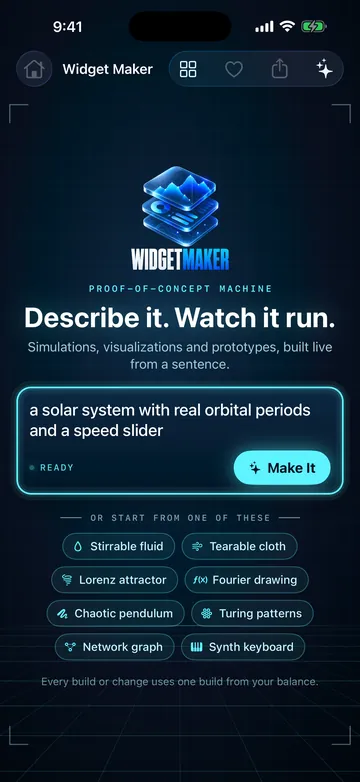
  1. The WidgetMaker home screen: a sentence typed into the prompt, with preset ideas below it

    Step 01

    Describe it

    Say what you want in plain words, or start from a preset. One sentence is enough.

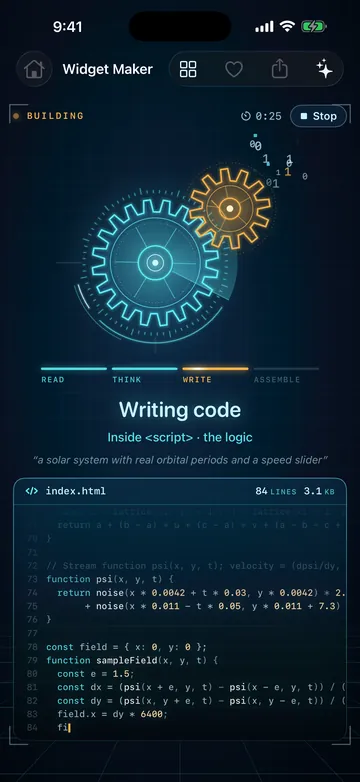
  2. WidgetMaker building: meshing holographic gears above the code as it is written

    Step 02

    Watch it build

    AI writes the program while you watch the code stream in. About a minute later, it’s running.

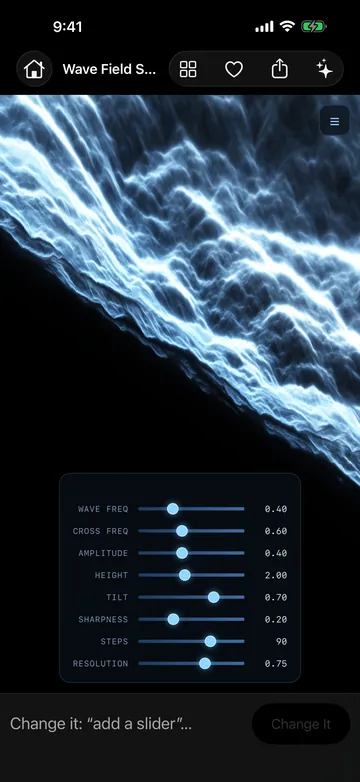
  3. A running wave-field shader with sliders for every factor, and a Change it field below

    Step 03

    Touch it. Change it.

    Play with it, turn the dials, then ask for more: “add a gravity slider”, “make it 3D”. Every version is kept.

What you get

A real program every time. And it’s yours.

  • Read the code. Keep the code.

    Read, copy, share or email the full source: one self-contained HTML file that opens in any web browser.

  • Record a clip

    Capture your creation running and share the video.

  • Sandboxed by design

    Every creation runs in a locked-down sandbox with no network access.

  • Private. No account.

    No sign-up, no sign-in. What you make stays private to you, on your device.

  • A Featured collection, built in

    Hand-picked creations, from a black hole to a synth, ready to open the moment you install.

  • iPhone, iPad and Mac

    One purchase on the App Store gets you all three.

Get WidgetMaker.io

What will you wish for first?

  • One purchase, $4.99 on the App Store.
  • 10 builds included. Each new build or change uses one.
  • More builds whenever you want them, with credit packs.
  • iPhone, iPad and Mac. Buy once, get all three.
  • No account, no sign-in. Your creations stay private, on your device.

$4.99Includes 10 builds

Download on the App Store

Running live · sandboxed

Example

Assembling…

One sentence

Make your own